
When I attempt to refund a transaction, I get a message that I have insufficient funds to complete the refund. What should I do?
In order to complete a refund, Stripe needs to be able to transfer funds from your Stripe account to the ClassroomParent platform account, so it can return the funds to the credit card issuing bank.
If there are no funds in your Stripe account, or the amount in your Stripe account is less than the amount your are attempting refund, the refund will fail.
There steps you must take to ensure you have sufficient funds to complete the refund. You will do these through your Stripe account.
- Log into your Stripe account
- Click on Balances
- On the Balances page, click the Manage Payouts drop down (your Balances value may be $0)
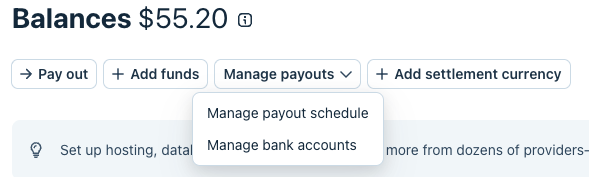
- Choose Manage Payout Schedule and choose Manual Payments and submit
- Choose the Add Funds button and select to add to the Payments Balance, then enter in the amount to transfer. I suggest transferring a bit more than you need to make the refund. You do not need to include any fees, only the sum of the order lines.
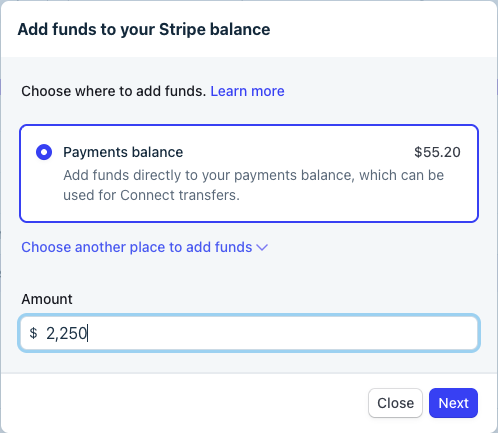
- Continue to choose the method to provide the funds. This should be a transfer of funds from your bank account.
- Complete the transfer. IMPORTANT: It may take a couple days before the transfer is completed. Once your account shows the amount in your balance, you can then refund the transaction.
- After the refund has been completed, return to your Stripe account to change your payout schedule back to what it was before.
If you continue to have challenges refunding transaction, please reach out to ClassroomParent support and we can help.